
Digital Basics - New Business Beginners Guide
- By vanessa wright
- •
- 01 Feb, 2018
- •
Are you opening a new business and need a how to guide for digital marketing? Here are the basics.

Several years back my husband and I set our sights on opening a local small business. Through the process I learned several tips & tricks as well what's needed from the start. Below are a few basic elements along with free or minimally priced tools you can access. This is a minimal starters guide for a local small business owner if you are in a highly competitive industry and must have a strong digital presence once your doors open I recommend that you seek out advice from a digital professional.
I would imagine at this stage of the game you have already designed your logo, mission statement, and have a clear idea of your differentiators. Now how to showcase who you are, what you do, and how to contact you.
1. Website - I'm sure it goes without saying but in today's world you must have a website from the local Handyman to a Boutique. Think of a website as today's version of your business card & sign. It showcases who you are, what you do, and how to contact you. There are several user friendly website building tools available which include templates to get you started. Don't pay attention to what the images look like, focus on the style and the feel of the template because you can edit content, images, and or pages. I personally have used Duda & WordPress and found them both to be very user friendly. If you are not a Millennial or coder don't worry, my 92 year old grandmother could build it.
Access Duda templates HERE - It's pretty self explanatory at this point. Choose the style you like and start editing. Their site will walk you through the steps and even provide some easy tutorials.
With WordPress you can also create one for free just go directly to WordPress click on get started and it will walk you through the steps.
I would recommend going with the free option from Duda & WordPress first just to play around and see where your comfort level is. Don't spend too much time on it, maybe 15-20 minutes to explore and get a feel for their editors and make your decision on ease of use for yourself. Pro with WordPress is that it's the most used website platform and there are plenty of resources available for beginners either through WordPress, forums, or how to videos on YouTube. But as I said go with what you are comfortable with even check out additional website options.
2. Now you have an idea of a website you'll need a domain & hosting. With both WordPress & Duda they can add this feature on and direct you to several options. However, Google actually refers hosting of WordPress sites to BlueHost it's very cost effective and a bit less than GoDaddy and some of the others. But hey really we are only talking a couple extra dollars a month so if it's easier for you to start directly with Duda & WordPress options by all means do so. You can also search available domain names through Google Domains and even purchase the domain name directly from the site....easy peasy right!
3. At this stage in the game I would imagine that you have probably spent a bit more time than you anticipated, watched several how-to videos, got lost in forums, or have been like a fish to water with no issues at all. Either way the next step is to set up your Google Webmaster & Bing Webmaster accounts, which are both free. Yes set up Bing as well, even though Google has the lion share of the market for search engines do not forget about Bing. Bing actually has a more affluent user base, think about that friend or family member who doesn't understand how to change their default web browser, they exist. Both of these tools allow you the ability to push Google & Bing to read and index your site as well as alerting you with possible issues with your site. They will in time read your site without this but why wait. Once you set up an account it walks you through to the steps on adding your web property to the tool.
After your property is tied to your account fetch and render your site and request for the site to be indexed. Click on Crawl on the left hand side, from the dropdown select Fetch, click fetch & render, once the results have show up click request indexing. It also allows you to see your site as Google & Bing see your site if you click on the 2 arrows on the far right side of the results. If you are getting pretty comfortable with this at this point also upload your sitemap, if you are not sure where to start it's okay, this is the beginners guide remember, don't sweat the details just focus on the basics.
It will take some time may be a couple hours, days, or even a week or so for your site to become indexed (think of this as Google/Bing acknowledged that your site exists). You can log back into your account and under the index tab check to see if it has been indexed. These tools also allow you to see where you stack up in regards to keyword ranking, page rank, click through rate, & impressions but that's a conversation pasted the basics.
I do have to give a disclaimer, do not anticipate your site to be on page one immediately after this is completed. It takes time, content, and additional factors to get your website to the first page. If page rank is a concern I would recommend seeking advice from someone who specializes in SEO (Search Engine Optimization). However, if your site is merely to have a professional clean look to refer clients to don't get caught up in the details you are good to go.
4. Register your business with Google, Bing, Data Aggregators, Social Media Channels, & top business directories. This is used mostly for those easy searches when someone doesn't remember your website but knows your name. Not every person has the same search habits so make sure you are easily found for people searching by your name.They may find you in the maps section of Google, in the raw search results, or go to a top directory, either way, it is free. Register all your listings to ensure you can be easily found before they find your competition.
The easiest tool I've used is Moz Local. You can just enter in your business name and zip code and it will pull through the results of where you are and are not listed. If you have the time use this as a cheat sheet to register your listing, they provide you with all the links directly to Google, Acxiom, Yelp, and many more. If you don't want to spend the time you can pay Moz a minimal annual fee to do this for you, the option is yours.
Another disclaimer I have to give is that you should directly own and manage your Google & Bing listings because there are additional feature and benefits later down the road. Go to Google My Business & Bing Places follow the step and your pretty much done.
Hopefully this has been helpful with digital basics. For more information on additional tips & tricks or professional help please contact me.
I would imagine at this stage of the game you have already designed your logo, mission statement, and have a clear idea of your differentiators. Now how to showcase who you are, what you do, and how to contact you.
1. Website - I'm sure it goes without saying but in today's world you must have a website from the local Handyman to a Boutique. Think of a website as today's version of your business card & sign. It showcases who you are, what you do, and how to contact you. There are several user friendly website building tools available which include templates to get you started. Don't pay attention to what the images look like, focus on the style and the feel of the template because you can edit content, images, and or pages. I personally have used Duda & WordPress and found them both to be very user friendly. If you are not a Millennial or coder don't worry, my 92 year old grandmother could build it.
Access Duda templates HERE - It's pretty self explanatory at this point. Choose the style you like and start editing. Their site will walk you through the steps and even provide some easy tutorials.
With WordPress you can also create one for free just go directly to WordPress click on get started and it will walk you through the steps.
I would recommend going with the free option from Duda & WordPress first just to play around and see where your comfort level is. Don't spend too much time on it, maybe 15-20 minutes to explore and get a feel for their editors and make your decision on ease of use for yourself. Pro with WordPress is that it's the most used website platform and there are plenty of resources available for beginners either through WordPress, forums, or how to videos on YouTube. But as I said go with what you are comfortable with even check out additional website options.
2. Now you have an idea of a website you'll need a domain & hosting. With both WordPress & Duda they can add this feature on and direct you to several options. However, Google actually refers hosting of WordPress sites to BlueHost it's very cost effective and a bit less than GoDaddy and some of the others. But hey really we are only talking a couple extra dollars a month so if it's easier for you to start directly with Duda & WordPress options by all means do so. You can also search available domain names through Google Domains and even purchase the domain name directly from the site....easy peasy right!
3. At this stage in the game I would imagine that you have probably spent a bit more time than you anticipated, watched several how-to videos, got lost in forums, or have been like a fish to water with no issues at all. Either way the next step is to set up your Google Webmaster & Bing Webmaster accounts, which are both free. Yes set up Bing as well, even though Google has the lion share of the market for search engines do not forget about Bing. Bing actually has a more affluent user base, think about that friend or family member who doesn't understand how to change their default web browser, they exist. Both of these tools allow you the ability to push Google & Bing to read and index your site as well as alerting you with possible issues with your site. They will in time read your site without this but why wait. Once you set up an account it walks you through to the steps on adding your web property to the tool.
After your property is tied to your account fetch and render your site and request for the site to be indexed. Click on Crawl on the left hand side, from the dropdown select Fetch, click fetch & render, once the results have show up click request indexing. It also allows you to see your site as Google & Bing see your site if you click on the 2 arrows on the far right side of the results. If you are getting pretty comfortable with this at this point also upload your sitemap, if you are not sure where to start it's okay, this is the beginners guide remember, don't sweat the details just focus on the basics.
It will take some time may be a couple hours, days, or even a week or so for your site to become indexed (think of this as Google/Bing acknowledged that your site exists). You can log back into your account and under the index tab check to see if it has been indexed. These tools also allow you to see where you stack up in regards to keyword ranking, page rank, click through rate, & impressions but that's a conversation pasted the basics.
I do have to give a disclaimer, do not anticipate your site to be on page one immediately after this is completed. It takes time, content, and additional factors to get your website to the first page. If page rank is a concern I would recommend seeking advice from someone who specializes in SEO (Search Engine Optimization). However, if your site is merely to have a professional clean look to refer clients to don't get caught up in the details you are good to go.
4. Register your business with Google, Bing, Data Aggregators, Social Media Channels, & top business directories. This is used mostly for those easy searches when someone doesn't remember your website but knows your name. Not every person has the same search habits so make sure you are easily found for people searching by your name.They may find you in the maps section of Google, in the raw search results, or go to a top directory, either way, it is free. Register all your listings to ensure you can be easily found before they find your competition.
The easiest tool I've used is Moz Local. You can just enter in your business name and zip code and it will pull through the results of where you are and are not listed. If you have the time use this as a cheat sheet to register your listing, they provide you with all the links directly to Google, Acxiom, Yelp, and many more. If you don't want to spend the time you can pay Moz a minimal annual fee to do this for you, the option is yours.
Another disclaimer I have to give is that you should directly own and manage your Google & Bing listings because there are additional feature and benefits later down the road. Go to Google My Business & Bing Places follow the step and your pretty much done.
Hopefully this has been helpful with digital basics. For more information on additional tips & tricks or professional help please contact me.

7 examples of online advertising, google, sem, seo, google maps, content marketing, social media advertising, video, & display.

We have all been a victim or prey to arrogance. From the nitty muggin' know it all to the boaster.
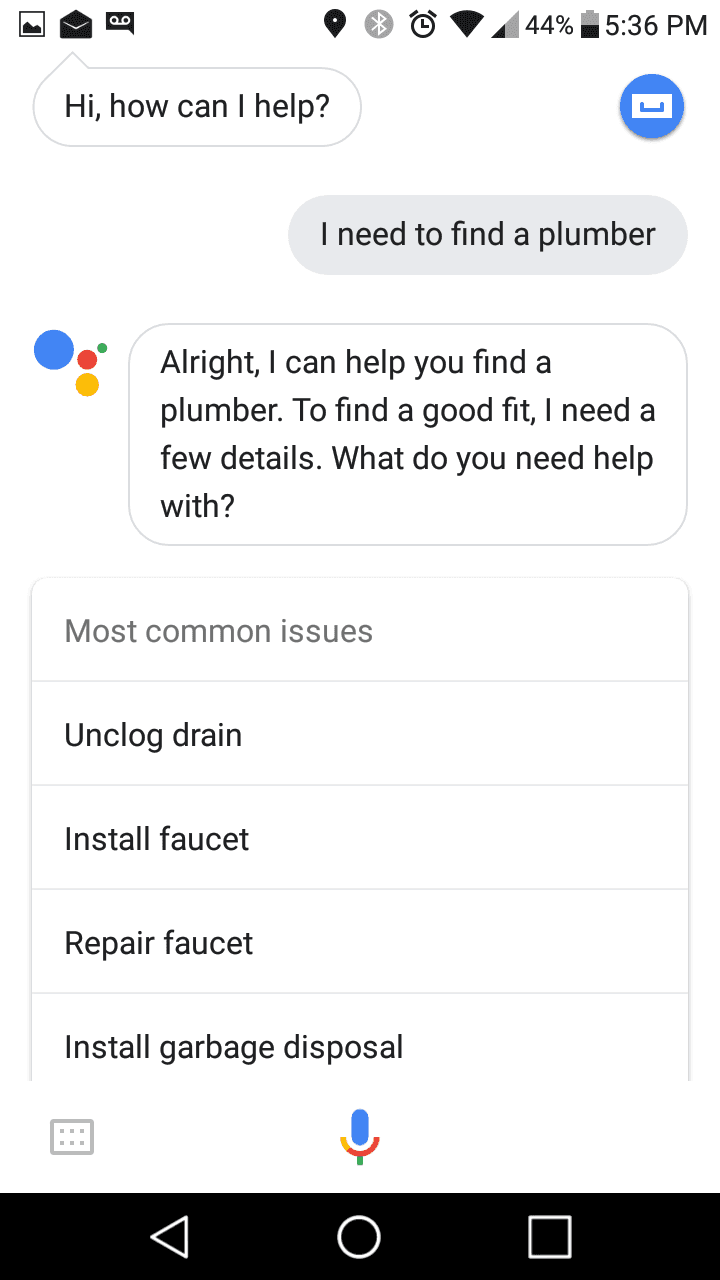
Do you remember registering your listing directly with Google and the impact it made your business? Well, that time is here again but for voice searches. Get listed today!

We are in the modern age of the wild west. Technology is moving faster than we can adapt.....or is it?

Anyone can make one:
For better or worse, anyone can write a blog post about anything they want. Everyone has a voice and the best voices will rise to the top.
The writer can show their personality:
In blog posts, the writer has more leeway to add in their voice and personality than other types of writing.
Blogs are a great form of mass communication:
You can help people, learn new things, entertain your audience-the possibilities are endless and amazing. Blogging opens up all of these to a very wide audience.
You can make money:
Get the right blog going and you can make a lot of money through advertising and sponsored posts.
It allows people to craft better thoughts:
Instead of reading haphazard, uneducated Facebook statuses, it's much better to see people's thought process in a well-written blog post.
You can establish a community:
Blogging allows you to connect with other individuals who share the same interests. Sharing ideas and opinions within your community helps establish yourself as a thought leader.
Good for SEO:
Keeping content on your site fresh and relevant, you can use your blog to boost the search engine ranking (SEO) of your site and your business.
It brings people back to your site:
If your blog is strong enough and updated regularly, people will come back looking for more and bring traffic back to your site as well.
It's free:
It costs you a grand total of zero dollars to post to the blog, so if you have something to say, there's nothing to stop you.
You can establish yourself as a thought leader:
A blog is a great place for your original thoughts, and it can be a wonderful way to show off your individuality. If people like your ideas, you can become a thought leader in your industry!
What else do you love about blogs? Let me know!
For better or worse, anyone can write a blog post about anything they want. Everyone has a voice and the best voices will rise to the top.
The writer can show their personality:
In blog posts, the writer has more leeway to add in their voice and personality than other types of writing.
Blogs are a great form of mass communication:
You can help people, learn new things, entertain your audience-the possibilities are endless and amazing. Blogging opens up all of these to a very wide audience.
You can make money:
Get the right blog going and you can make a lot of money through advertising and sponsored posts.
It allows people to craft better thoughts:
Instead of reading haphazard, uneducated Facebook statuses, it's much better to see people's thought process in a well-written blog post.
You can establish a community:
Blogging allows you to connect with other individuals who share the same interests. Sharing ideas and opinions within your community helps establish yourself as a thought leader.
Good for SEO:
Keeping content on your site fresh and relevant, you can use your blog to boost the search engine ranking (SEO) of your site and your business.
It brings people back to your site:
If your blog is strong enough and updated regularly, people will come back looking for more and bring traffic back to your site as well.
It's free:
It costs you a grand total of zero dollars to post to the blog, so if you have something to say, there's nothing to stop you.
You can establish yourself as a thought leader:
A blog is a great place for your original thoughts, and it can be a wonderful way to show off your individuality. If people like your ideas, you can become a thought leader in your industry!
What else do you love about blogs? Let me know!
